

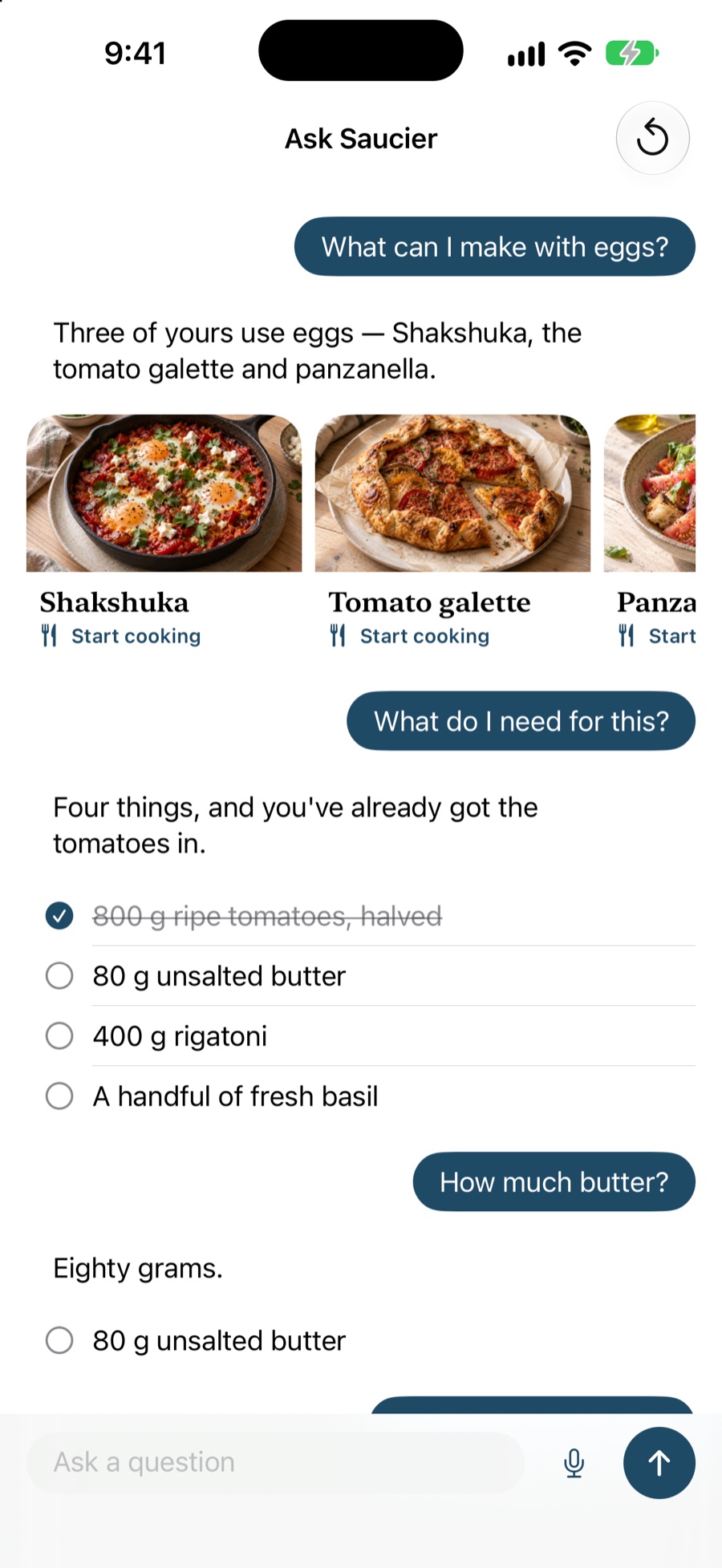
Saucier’s assistant is called Ask Saucier, and the useful thing about it is what it is not connected to. It does not search the web, it does not have an account, and it does not post your questions anywhere. It runs on the foundation model built into your iPhone, and the only things it knows about are the recipes you saved and the one you are cooking right now.
What you can actually ask it
Every one of these is answered from your own library or the recipe in front of you, not from the internet.
“What can I make with eggs?”
Saucier searches your library by ingredient as well as by name, and answers with cards you can tap to start cooking. It is the fastest route from a half-empty fridge to something you already know you like.
“What do I need for this?”
You get the live ingredient list, not a description of it. Tick something off in the answer and it ticks off in cook mode too — they are the same list, not two views that drift apart.
“How much butter?”
Mid-recipe, with your hands full, the answer is the one line you wanted rather than the whole list again.
“I’ve no buttermilk”
Saucier suggests a substitution with the ratio and tells you what it will change about the result, which is the part most substitution charts leave out.
“Make it for six”
The amounts get rescaled. Ask for grams when the recipe is in cups, or ounces when it is in grams, and you get the conversion — including the honest answer that some conversions depend on the ingredient.
“Time the roasting”
A timer starts, named after the thing it is timing, and keeps running in the background.
“Read me the first step”
Useful on its own, and much more useful with Voice switched on.
Hands-free, properly
Switch Voice on and Saucier listens, sends your question as soon as it hears the sentence end, and reads the answer back. You can ask it to move to the next step, start a timer, or tell you what is still on — all without touching a screen you would rather not touch with those hands.
This is the part that is hard to get right and the reason the feature exists. A recipe app that needs a clean fingertip every ninety seconds is a recipe app you stop using halfway through the recipe.
Why on-device matters here
Running on Apple Intelligence rather than a cloud model has three consequences that you can actually feel:
- It works with no signal. A basement kitchen, a holiday cottage, a plane — the model is on the device, so the assistant does not care.
- There is nothing to leak. Your recipes and your questions are never transmitted, because there is nowhere to transmit them to. Saucier runs no server. See the privacy policy.
- There is nothing to pay for. Cloud inference has a per-question cost, and apps that pay it pass it on as a subscription. Saucier does not have that cost, which is a large part of why it does not have a subscription either.
The trade-off is honest: an on-device model is smaller than a frontier cloud model. Ask Saucier is built around that limit rather than against it. It answers by handing you the real ingredient, the real step and the real timer, so the thing you end up reading is your recipe rather than the model’s recollection of it.
It also reads recipes that were never written as recipes
The same on-device intelligence does the other hard job: pulling a recipe out of a page that never published one. A caption that tells you a story and mentions the quantities in passing is not structured data, and no amount of HTML parsing will make it so. Apple Intelligence reads the prose and produces the ingredient list and the steps.
That is what makes saving from Instagram and TikTok work at all.
Where to find it
- From the library, tap Ask Saucier to ask about everything you have saved.
- From cook mode, tap Ask to ask about the recipe you are making.
If your device does not have Apple Intelligence available, Saucier does not show the button. A button that opens a chat which cannot answer is worse than no button.
Questions
Does Ask Saucier work without an internet connection?
Yes. The model runs on your iPhone or iPad, so questions about a recipe you have already saved are answered with no network at all. You only need a connection to save something new from the web.
Are my questions sent to a server?
No. Ask Saucier is built on Apple Intelligence’s on-device foundation model. Your questions, your recipes and the answers never leave your device, and Saucier has no server of its own to send them to.
Which devices support Ask Saucier?
Any iPhone or iPad that supports Apple Intelligence, with it turned on in Settings. On devices without it, the rest of Saucier works exactly as normal — saving, cook mode, timers, sync and search are all unaffected. Saucier hides the Ask button rather than offering a chat that cannot reply.
Will it invent a recipe that does not exist?
It is not trying to. Ask Saucier is grounded in your library and in the recipe open in front of you, and answers by handing back the real thing — the actual ingredient list, the actual step, the actual timer — rather than by describing it from memory.
Can I use it while my hands are dirty?
That is the point of it. Turn Voice on and Saucier listens, answers out loud and moves the recipe on a step, so you can go from putting a pan down to picking it up again without touching the screen.