

Most recipe apps stop caring the moment the recipe is saved. You get a web page in a nicer font, and then you are on your own: pinching to zoom with a knuckle, losing your place in a wall of text, waking the screen with the back of your hand because the front of it has raw chicken on it.
Cook mode is Saucier’s answer to the twenty minutes that actually matter.
One step at a time, in type you can read
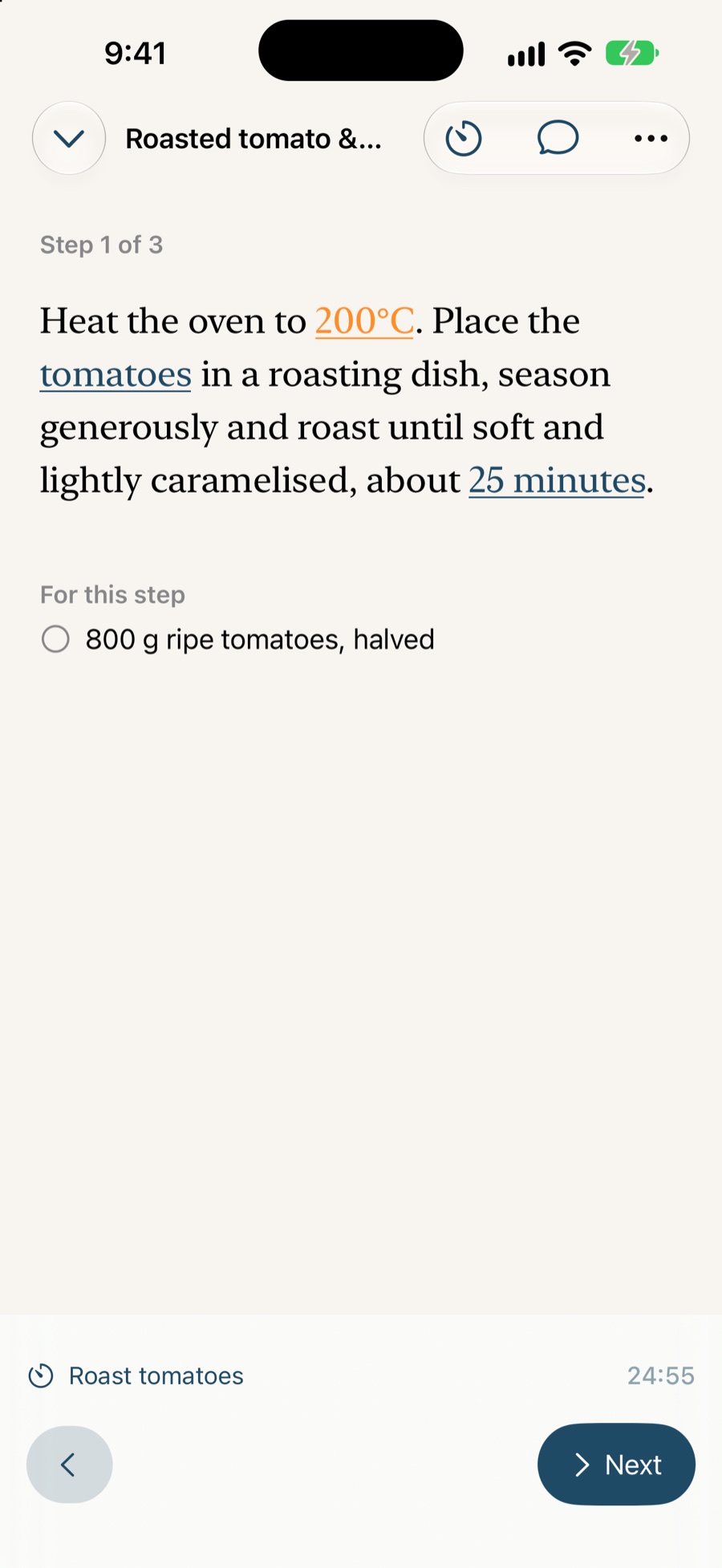
Tap Make It and the recipe stops being a document. You get the step you are on, large enough to read from across the counter, with the ingredients that step needs right there rather than scrolled away at the top of the page.
Next is the big obvious control. Previous is there but small, because of the two it is the one you want by accident far less often. The screen stays awake throughout.
Timers that behave like kitchen timers
Start a timer from a step and three things happen that a web page cannot do:
- It keeps running in the background, so switching apps or locking the phone does not quietly cancel your proving time.
- It appears on your Lock Screen as a Live Activity, so the time left is visible without unlocking anything.
- It notifies you when it is done, and tapping that notification puts you back on the exact recipe and step it came from.
Several can run at once. Two recipes can run at once. The On Now list is the one place that shows you everything you currently have going, and it is reachable from every screen in the app — because what is on the hob is a property of your kitchen, not of whatever screen you happen to be looking at.
Ask out loud
Switch Voice on and you can stop touching the phone altogether:
- “Read me the next step.”
- “How much butter?”
- “What do I still need?”
- “Set a timer for twelve minutes.”
- “I’ve no buttermilk.”
Saucier listens, answers out loud, and acts — moving the step on, starting the timer, scaling the amounts. It runs on your device, so it works with no signal and sends nothing anywhere. More about Ask Saucier →
Ticking things off
Ingredients tick off as you use them, so coming back after a distraction does not mean re-reading the list to work out whether the butter already went in. The tick list is shared with the assistant’s answers — tick it in one place and it is ticked in the other.
The grocery list, before you start
Before any of the above, there is the shopping. Send one ingredient or the whole recipe to your Reminders grocery list, and the button changes to confirm it landed. It used to look identical whether you had tapped it or not, which meant the only way to be sure was to open Reminders — and the usual response to that is to tap everything twice.
If you have planned several meals, the Week tab also builds one in-app grocery list from all of them.
Accessibility is not an afterthought
Cook mode is tested at the largest Dynamic Type sizes, where the controls stack rather than truncate, and every icon-only control carries a VoiceOver label. Reduce Motion is honoured. A recipe you cannot read at the size you need it is not a recipe you can cook.
Questions
Does the screen stay on while I cook?
Yes. Cook mode keeps the display awake, so the step you are on does not vanish while you are elbow-deep in something and cannot tap to wake it.
Do timers keep running if I leave the app?
Yes. Timers continue in the background, appear on the Lock Screen as a Live Activity, and notify you when they finish — even if you have switched to Messages or locked the phone.
Can I run more than one timer at once?
Yes, and across more than one recipe. The On Now list gathers every timer and every recipe you have on the go into one place, reachable from anywhere in the app.
What happens if a notification taps me back into the app?
Tapping a timer notification takes you back to the exact recipe and step it belongs to, rather than dropping you at the library to find your place again.
Can I cook without touching the screen at all?
Close to it. With Voice switched on you can ask for the next step, ask what is in the recipe, or start a timer out loud, and Saucier answers out loud. See Ask Saucier.